01
Record costs by project
Keep expense amounts and descriptions with the project they belong to, rather than mixing spending across jobs.
FROM SITE SPENDING TO PROJECT CLARITY
Construction expense tracking software for recording project spending, keeping receipt photos together and comparing actual costs with your budget.
Keep materials, site labor and everyday costs close to the work. Give your team a shared record to review before the next spending decision.
Free plan available · No card needed
KEEP THE DETAILS THAT MATTER
Build a useful spending record as work happens, so your office team has more context than a total alone.
Keep expense amounts and descriptions with the project they belong to, rather than mixing spending across jobs.
Attach receipt photos to expense records so authorized teammates can review the supporting details.
Use recorded spending alongside your project cost budget to understand how much has been used and what remains.
A VIEW BEYOND THE RECEIPT
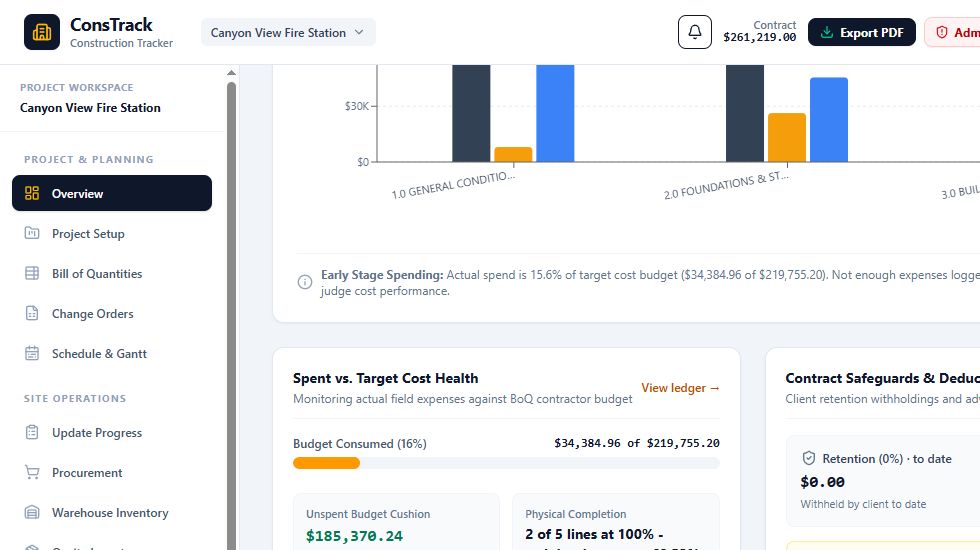
Explore the sample project overview to see expense totals, budget comparisons and other project records in one workspace.
ConsTrack / Sample project cost overview
BETTER RECORDS FOR BETTER CONVERSATIONS
Authorized teammates can review project expenses and supporting photos according to their assigned permissions. Connected workspaces receive saved updates automatically, with reconnection checks when a connection is interrupted.
Budget comparisons depend on the accuracy and completeness of your records. Logging an expense does not move money, verify a receipt or replace accounting and tax review.
BEFORE YOU GET STARTED
Yes. ConsTrack works in a mobile web browser, so authorized team members can enter expense details and attach receipt photos using their phones.
Yes. The project overview brings recorded expenses and target cost budget information together. Keep your entries complete and accurate so comparisons reflect the records you have entered.
No. Active company membership, project assignments and module permissions determine who can view or edit records. Business administrators manage access.
No. Expense entries and receipt photos are business records. Recording an expense does not transfer money or certify that a receipt is accurate or legally sufficient.
Yes. The free plan includes one project with the owner and one additional person per project. Storage limits apply. You can also explore the demo before creating an account.
START WITH YOUR NEXT PROJECT EXPENSE
Try ConsTrack free with one project and bring your expense records into a shared workspace.